CRM vs PRM: what's the difference?
Startup and growing partner programs with expanding partner ecosystems face a critical question when building their technology stack: do we really need a partner relationship management (PRM) platform, or can our existing CRM handle partner management?
It’s a fair question, especially when CFOs are scrutinizing every software expense. The short answer is that CRMs and PRMs serve fundamentally different purposes. A CRM tracks your relationship with customers; a PRM manages your relationship with the partners who help you reach those customers. Trying to use a CRM for partner management is like using a spreadsheet for accounting—technically possible, but you’ll quickly hit limitations that cost you time and money.
This guide explains the differences between CRM and PRM platforms, their respective benefits, and how they work together in a modern channel operation.
Key takeaways:
- CRMs manage direct customer relationships; PRMs manage indirect channel partner relationships
- PRMs include capabilities CRMs lack: partner portals, deal registration, MDF tracking, through-channel marketing, and partner training
- The two systems should integrate to provide a complete view of both direct and indirect revenue
- Organizations with more than 20-30 active partners typically see meaningful ROI from dedicated PRM software
What is a CRM?
A CRM (customer relationship management) platform manages the business relationship between your organization and its end customers—both existing customers and prospects you’re trying to convert.
The primary functions of a CRM include:
- Storing customer contact information and interaction history
- Tracking deals through your sales pipeline
- Managing follow-up tasks and reminders for sales reps
- Supporting customer service teams with case management
- Generating reports on sales performance and forecasting
- Providing a shared record so any team member can pick up where another left off
Popular CRM platforms include Salesforce, Microsoft Dynamics 365, HubSpot, Zoho CRM, and Pipedrive. Most B2B companies adopt a CRM relatively early because the pain of managing customer relationships in spreadsheets becomes obvious quickly.
What are the Benefits of a CRM?
Companies adopt CRMs primarily for visibility and efficiency in their direct sales operations:
Centralized customer data. Instead of customer information scattered across email inboxes, spreadsheets, and individual rep’s notes, everything lives in one place. When a customer calls, anyone on your team can pull up their history in seconds.
Sales pipeline visibility. Leadership can see exactly where deals stand, which reps are hitting quota, and what revenue to expect next quarter. This makes forecasting more reliable and helps identify problems before they become crises.
Reduced impact of turnover. Sales reps change jobs frequently. With a CRM, their accounts, notes, and deal history stay with the company. A new rep can take over an account without starting from scratch.
Automated follow-up. The CRM reminds reps when to follow up, logs activities automatically, and ensures no opportunity falls through the cracks due to human error.
What is a PRM?
A PRM (partner relationship management) platform manages your relationships with indirect sales channel partners—the resellers, distributors, MSPs, VARs, affiliates, and other partners who sell your products or services to their customers.
While a CRM asks “how do we manage our customers?”, a PRM asks “how do we enable and support the partners who help us reach more customers?”
PRM software addresses the unique challenges of channel sales:
- Partners aren’t your employees, so you can’t mandate how they work
- You need to share resources (marketing materials, pricing, training) without giving away sensitive information
- Multiple partners may pursue the same opportunity, creating potential for conflict
- You need to track which partners are actually driving revenue versus just taking up space in your program
- Partners need a self-service way to access your program without constantly emailing your channel team
The core capabilities of PRM platforms include:
- Partner portal: A branded, self-service site where partners log in to access everything they need
- Content management: A library of marketing materials, sales tools, and product documentation partners can use
- Deal registration: A system for partners to claim opportunities and avoid channel conflict
- Lead distribution: Routing leads from your marketing to qualified partners
- MDF/co-op management: Tracking marketing development funds and reimbursement requests
- Training and certification: Courses and assessments to ensure partners know how to sell and support your products
- Through-channel marketing automation: Tools for partners to run co-branded campaigns
- Analytics: Visibility into which partners are engaged, productive, and worth investing in
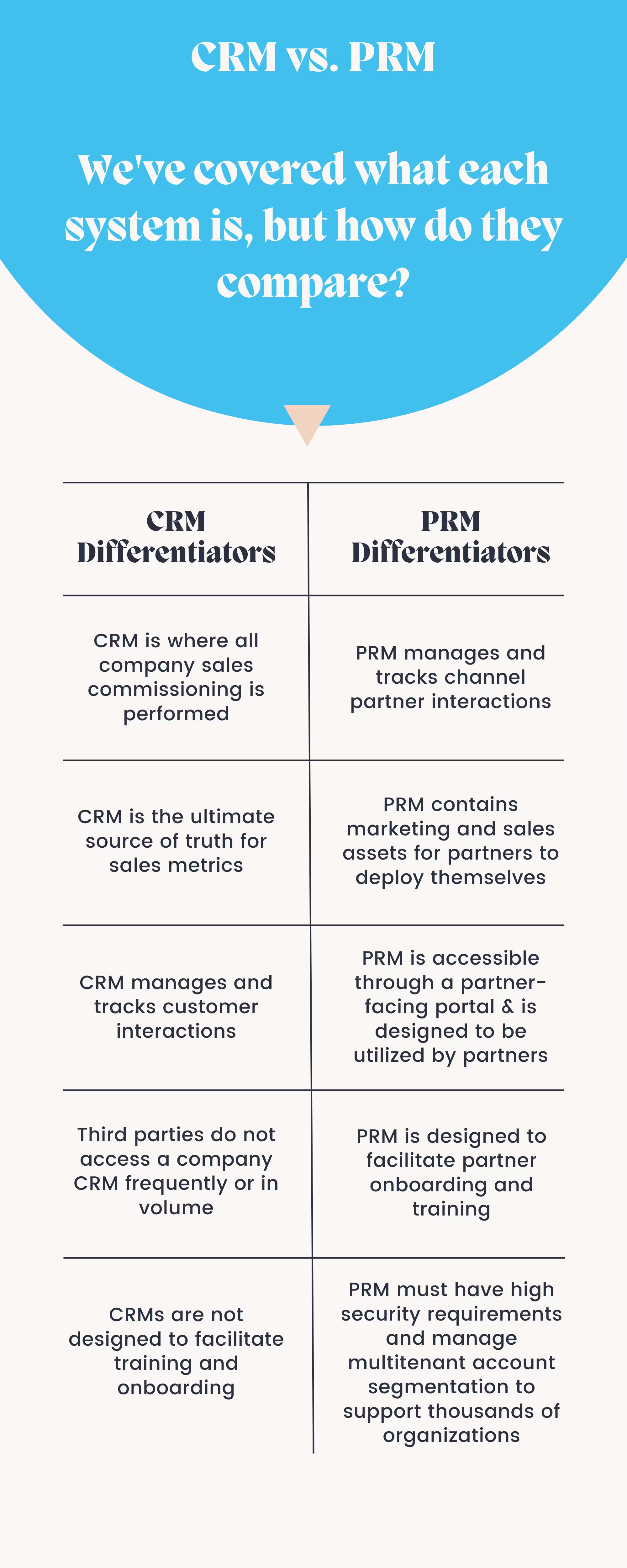
CRM vs PRM: A Direct Comparison
| Capability | CRM | PRM |
|---|---|---|
| Primary users | Your sales and service teams | Your partners (external) |
| Manages relationships with | End customers | Channel partners |
| Deal tracking | Direct sales pipeline | Partner deal registration |
| Content sharing | Internal sales enablement | External partner portal |
| Training | Employee onboarding | Partner certification programs |
| Marketing tools | Campaign management | Through-channel marketing |
| Fund management | Commission tracking | MDF/co-op tracking |
| Self-service access | Not typically needed | Essential (partners are external) |
The fundamental difference: a CRM helps your team sell to customers. A PRM helps your partners sell to their customers on your behalf.
What are the Benefits of a PRM?
In a previous blog on the reasons partner programs need a PRM software platform, we identified the core benefits. Here’s an updated look at why organizations invest in PRM:
A single source of truth for your partner program. Just as your website is your identity to customers, your PRM portal is your identity to partners. It’s where they go to register deals, grab marketing materials, complete training, and check their performance. Without a PRM, channel account managers end up fielding repetitive requests that partners could handle themselves.
CRM software genuinely can’t replace it. A CRM wasn’t designed for partners. It lacks partner portals, deal registration workflows, MDF tracking, through-channel marketing tools, and partner-specific analytics. Trying to force-fit a CRM into partner management creates workarounds that break down as your program scales.
Visibility into your indirect channel. When partners register deals through your PRM, you can see your indirect pipeline alongside your direct pipeline. You can track which partners are active, which are dormant, and where your channel revenue actually comes from. This data matters—research suggests partner-led deals tend to be 32% larger and close at nearly three times the rate of deals without partner involvement.
Scalability without proportional headcount. A PRM lets you support more partners without hiring more channel managers. Partners can onboard themselves, access resources 24/7, and handle routine tasks without human intervention. This is particularly important because the most productive partners often work outside traditional business hours or in different time zones.
Protection against turnover. CAMs change jobs frequently—some estimates put average tenure around 18 months in the technology industry. When a channel manager leaves, everything in the PRM stays: partner contacts, deal history, engagement data, and relationship notes. The new CAM can pick up where the previous one left off.
Flexibility across partner models. Whether you run an affiliate program, a two-tier distribution model, a VAR network, or some combination, a PRM can adapt. Different partner types can see different content, follow different workflows, and qualify for different incentives—all managed from one platform.
How Do a CRM and PRM Work Together?
A PRM doesn’t replace your CRM—the two systems should integrate. Your CRM tracks direct customer relationships; your PRM tracks partner relationships. When they’re connected, you get a complete picture of both direct and indirect revenue.
Modern PRMs integrate with major CRM platforms including Salesforce, Microsoft Dynamics 365, HubSpot, and Zoho. The integration typically involves bi-directional data sync: when a partner registers a deal in the PRM, that opportunity appears in your CRM. When the deal closes, commission data flows back to the PRM.
This integration provides several practical benefits:
Accurate pipeline forecasting. With both direct and partner-sourced deals visible in one view, your revenue forecasts reflect reality. Leadership doesn’t have to mentally add together separate reports from sales and channel teams.
Channel conflict prevention. If a lead already exists in your CRM (claimed by a direct rep), the PRM can flag it when a partner tries to register it—or vice versa. This prevents the painful conversations that happen when two people think they own the same deal.
Attribution clarity. When CRM and PRM data are connected, you can see the full customer journey. Did the partner source this opportunity, or did they just close a lead your marketing generated? Proper attribution helps you invest in the right partners and the right programs.
Operational efficiency. Without integration, someone has to manually reconcile data between systems. That’s error-prone and time-consuming. A proper integration eliminates duplicate data entry and keeps both systems current.
Modern PRM Capabilities
PRM software has evolved significantly in recent years. Today’s platforms include capabilities that weren’t common even a few years ago:
Automated partner onboarding. Instead of manually walking each new partner through paperwork and training, modern PRMs guide partners through a structured onboarding sequence. Partners complete forms, sign agreements, and finish required training at their own pace, with the system tracking progress and nudging when needed.
Through-channel marketing automation. Partners can execute co-branded email campaigns, social posts, and digital ads using templates you provide. The PRM handles personalization, compliance review, and performance tracking so partners can run marketing without becoming marketing experts.
AI-assisted insights. Some PRMs now use machine learning to identify which partners are likely to churn, which deals are at risk, and which partners might be ready for deeper engagement. These aren’t magic—they’re pattern recognition applied to partner behavior data—but they can help channel teams prioritize their time.
Analytics and attribution. Beyond basic reports, modern PRMs can track the entire partner-influenced customer journey. You can see not just which partner closed a deal, but what content they used, what training they completed, and how their performance compares to similar partners.
Getting Started with PRM
If you’re evaluating whether your program needs a PRM, consider a few practical questions:
- How many partners are you managing? Programs with more than 20-30 active partners typically struggle without dedicated software.
- How much time does your channel team spend on administrative tasks that partners could self-serve?
- Do you have visibility into your partner pipeline, or are you relying on partners to report their activity?
- Can you easily see which partners are actually productive versus just enrolled in your program?
For organizations ready to move beyond spreadsheets and email, a PRM provides the infrastructure to run a professional partner program. If you’re exploring options, take a look at what Unifyr PRM offers—and consult these guidelines on best practices for using a PRM software platform to ensure a successful implementation.